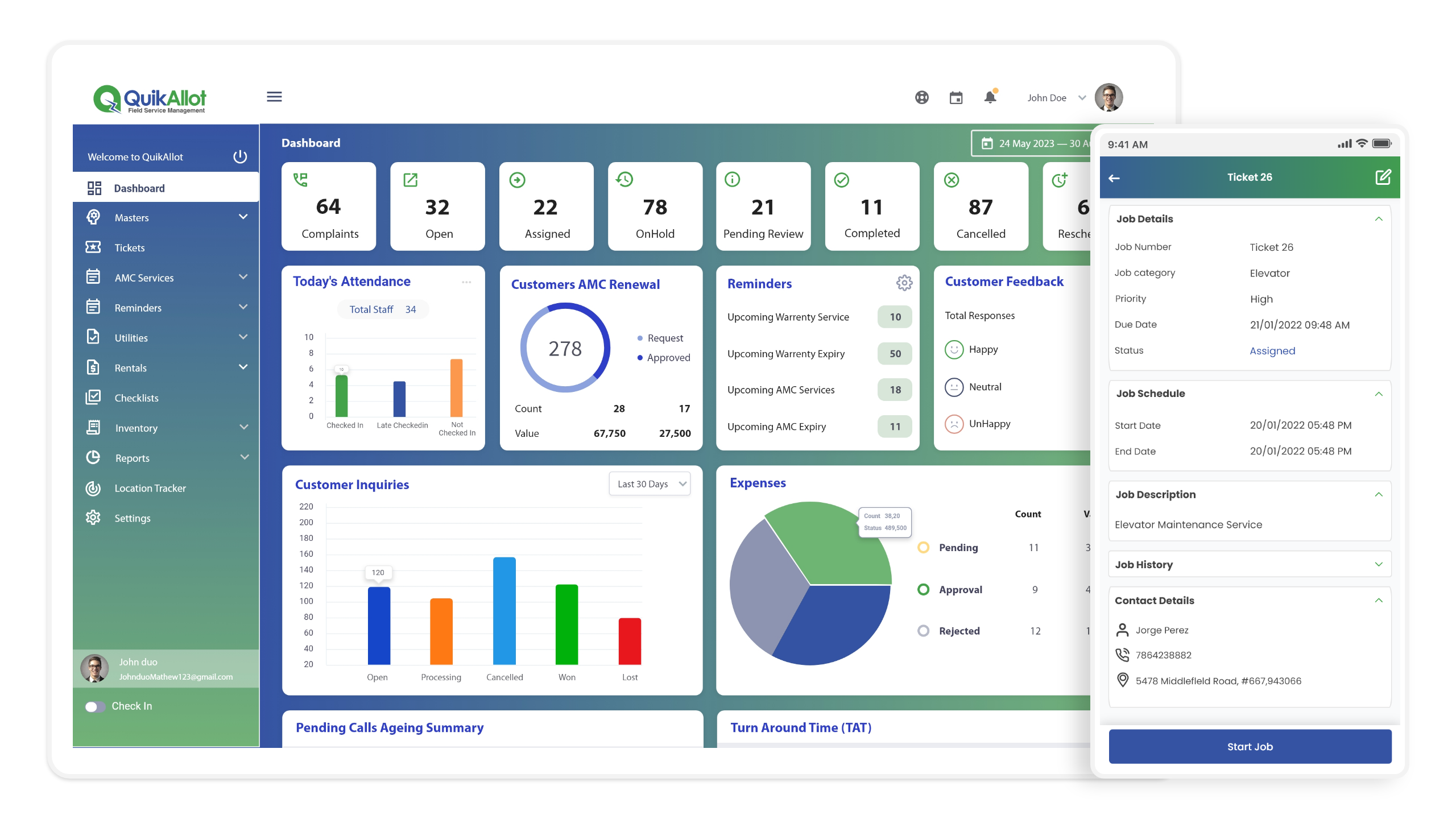
You manage crews, schedules, and customer expectations every day—and field services management software turns that chaos into reliable, trackable workflows. Choose the right system and you’ll automate dispatching, optimize routes, track inventory, and centralize job and customer data so your team finishes more jobs with fewer errors.
By the end, you’ll know which capabilities to prioritize and how to evaluate vendors with confidence.
Understanding Field Services Management Software
Field services management software coordinates the people, tools, and data that power on-site work. It helps you schedule technicians, track assets, communicate with customers, and measure job outcomes in real time.
Key Features and Capabilities
Core capabilities center on scheduling and dispatch. You get a drag-and-drop scheduler, technician skill matching, and automated job assignment based on proximity, availability, and certifications. Real-time GPS tracking and route optimization reduce travel time and fuel costs.
Mobile apps let technicians access work orders, customer histories, parts lists, and step-by-step procedures offline. Integrated asset management records serial numbers, warranty status, and maintenance history.
Payment capture, e-signatures, and automated invoicing speed cash collection.
APIs and integrations sync CRM, ERP, and inventory systems so data flows without manual entry. Reporting dashboards present SLAs, first-time fix rate, and technician utilization for performance management.
Benefits for Service-Based Businesses
You reduce downtime and increase revenue by improving scheduling accuracy and first-time fix rates. Faster routing and clear job details let technicians complete more jobs per day, raising billable hours without hiring additional staff.
You improve customer experience with automated arrival windows, SMS updates, and post-service surveys. Centralized asset and warranty data prevent unnecessary repeat visits and charge disputes.
Operational transparency comes from dashboards that show backlog, parts shortages, and technician productivity, enabling data-driven staffing and inventory decisions.
Security and compliance features—role-based access, audit trails, and encrypted data—protect customer records and help meet industry regulations.
Challenges Addressed by Field Services Management Software
You eliminate manual scheduling bottlenecks that cause missed windows and technician overtime. Automated dispatch reduces human error and ensures certified technicians handle specialized tasks.
Parts and inventory mismatches decline because the system links work orders to stock levels and reorder points. That lowers emergency parts shipments and reduces idle time waiting for components.
Communication gaps between dispatch, field staff, and customers shrink with in-app notes, photo uploads, and real-time status updates. This reduces callbacks and billing disputes.
You gain visibility into performance issues—low utilization, high travel time, or recurring failures—so you can implement targeted training, route changes, or preventive maintenance.
Selecting the Right Field Services Management Software
Focus on how the software will connect to your current tools, who on your team will use it daily, and the realistic steps required to deploy it in your environment.
Integration with Existing Systems
You need software that links directly to your core systems: CRM, ERP, inventory, and payroll. Verify supported connectors and APIs, and ask vendors for examples of real integrations with systems like Salesforce, SAP, QuickBooks, or your bespoke database.
Check for bi-directional sync to avoid duplicate data entry. Confirm how the product handles conflicts (record versioning, timestamps) and whether it supports middleware or iPaaS (e.g., MuleSoft, Zapier) for orchestration.
Request a data-mapping exercise and a test migration. Ensure the vendor provides documentation and an integration sandbox so you can validate business rules, custom fields, and scheduled jobs before cutover.
User Experience and Accessibility
Evaluate both the dispatcher/office and the technician mobile experience separately. For office users, look for drag-and-drop scheduling, bulk actions, and detailed reporting dashboards. For technicians, prioritize offline capability, clear step-by-step work orders, photo/signature capture, and low-friction time and expense entry.
Measure task completion time in trials. Ask your technicians to perform key tasks on typical devices and cellular connections. Confirm accessibility features (large touch targets, high-contrast modes) and language/localization options if you operate in multiple regions.
Implementation Best Practices
Define success criteria and KPIs up front: first-time fix rate, mean time to complete, schedule adherence, and billing cycle time. Use a phased rollout: pilot with one region or crew, iterate on workflows, then expand.
Assign a cross-functional steering team that includes operations, IT, finance, and field leads. Establish change-management items: training schedule, quick-reference guides, and a 30/60/90-day support plan. Track issues in a shared backlog and require the vendor to commit to SLAs for bug fixes and uptime.
Consider total cost of ownership: subscription, integration, training, and the expected productivity gains you will measure against those costs.